Eight languages and a rebuilt Roster
Use the app in eight languages, down to agent names and PDF exports, and manage players in a rebuilt Roster with Riot IDs you add yourself, automatic account matching and in-game roles.
Version 2.9.0 brings kogni to eight languages, down to agent names and the PDFs you export. The Roster is rebuilt as well: add your players' Riot IDs yourself, let kogni link the accounts from your scrims, and see clearly which scrims count for your team stats.
Eight languages
- Pick your language (Settings > Language): English, Português (Brasil), Deutsch, Français, Türkçe, 日本語, 简体中文 and Español (España). Portuguese now covers nearly every screen, and the six new languages are machine translations for now that will keep improving. The tray menu and desktop notifications follow your language too.
- VALORANT names in your language: agent, ability, map and weapon names appear as the VALORANT client writes them in your language.
- Prep Room cards in your language (Prep Room): the coaching cards follow the app language. Other text from kogni's servers, such as notifications and error messages, still arrives in English.
- PDF exports in every language: exported PDFs now print Turkish, Japanese and Chinese text instead of question marks.
A rebuilt Roster
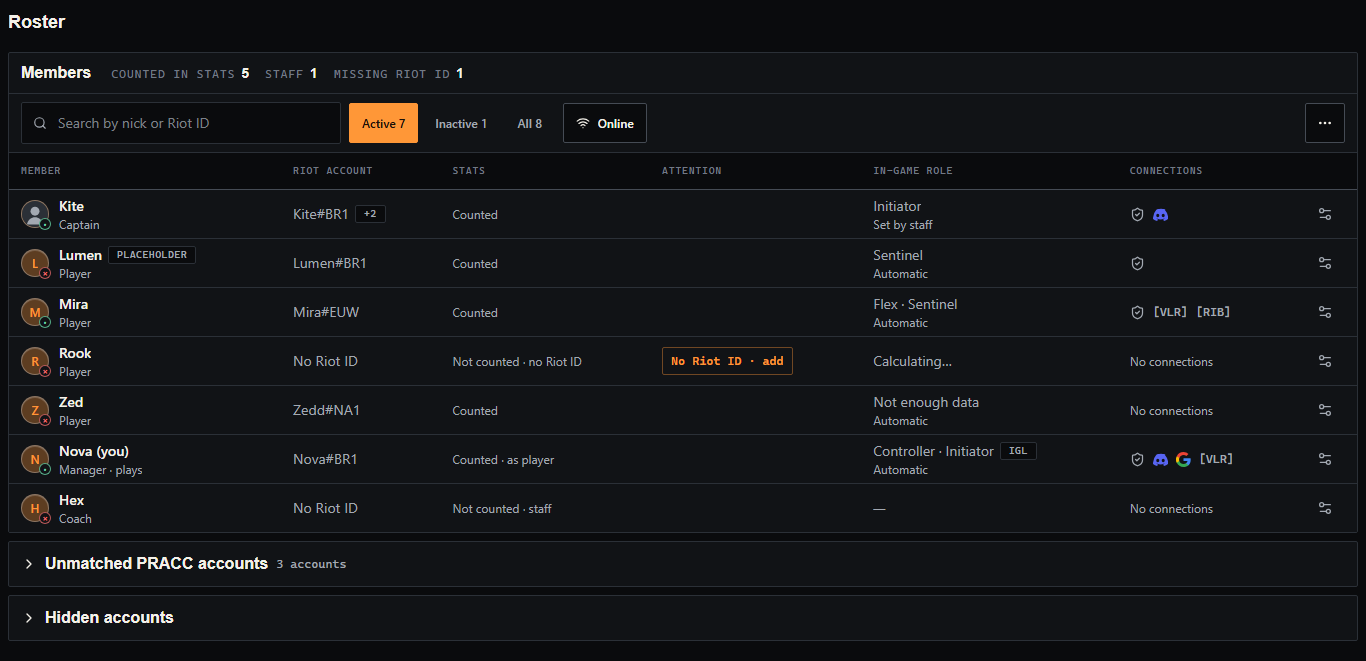
Admin > Roster.
- One row per player: their Riot ID, whether their games count for team stats, their in-game role, their connections and a settings button. Warnings that need you, such as a missing Riot ID, show in their own column.
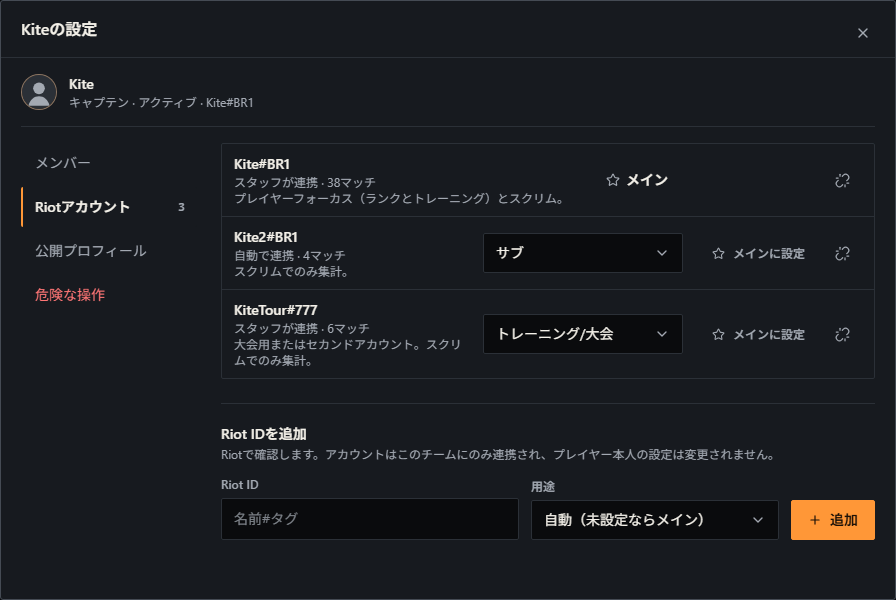
- Everything else in the settings: team role, status, in-game role and IGL, Riot accounts and public profiles, each in its own section. The team owner can also delete placeholder and unused accounts the team created.
- Riot IDs you add yourself (a player's settings > Riot accounts > Add Riot ID): staff can add a player's Riot ID, checked with Riot. Each account gets a category: Main feeds Player Focus and scrims; Alt, Training/Tournament and Borrowed count in scrims only; Ignore counts for nobody.
- Automatic matching: when kogni is sure, it links new accounts from your scrims to the right player on its own, and it never undoes a link you made or rejected. Unmatched accounts are listed apart with a suggestion, hidden accounts can be restored, and Match accounts now shows the links before they are made. In Settings > Riot IDs you can paste your full Riot ID into one field, and a failed save says why.
- In-game roles: each player shows their in-game role, worked out from the agents they play or set by staff, and an IGL tag.
- Deactivate keeps the account: deactivating or removing a player no longer locks their kogni account; they can still sign in and keep their other teams. Inactive players stay on the roster and leave player lists, stats and task assignee pickers until you activate them again.
Which scrims count
- Counts for team stats (Performance > Matches > open a match): a scrim counts for team stats when at least three roster players played it, and staff can change that for any match. Who counts shows who is credited.
- Stand-ins: they stay in your compositions and round stats, but only roster players get individual stats.
Also
- Dialogs in tabs: closing a dialog inside a tab puts keyboard focus back on the control that opened it.
Your matches, boards and settings stay as they were. Pick your language any time in Settings > Language.