Match replay on the tactical map
Watch any round back as a 2D replay on the tactical map, with abilities, player states and kills on one timeline, plus replay-powered heatmaps and a Discord bot for your team server.
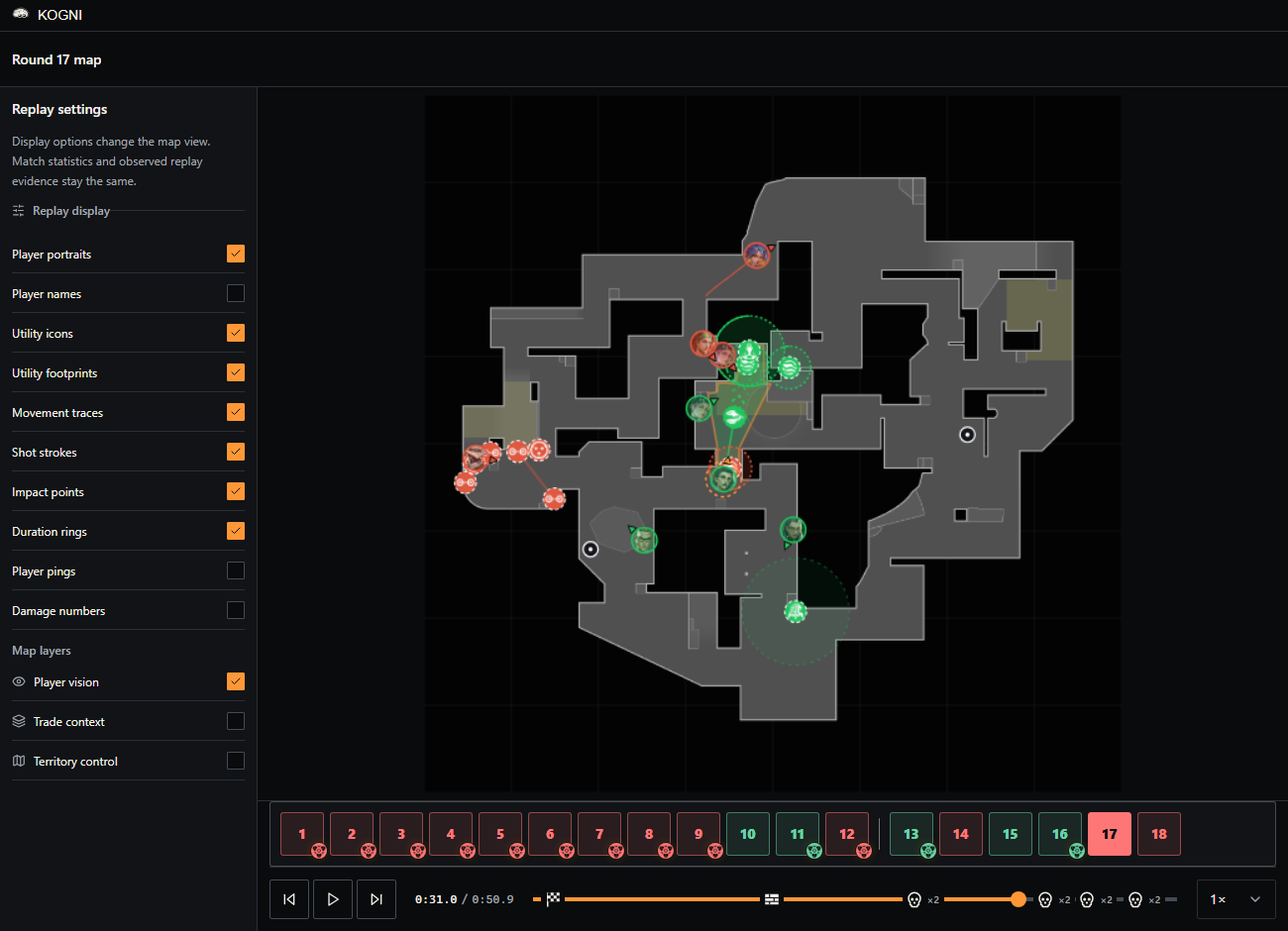
Version 2.7.2 turns the round tactical map into a replay. Attach the replay of a match once and every round plays back from above: where each player stood and looked, what utility was on the map and for how long, and how each fight resolved.
Highlights
- New match replay (Performance > Matches > open a match > Rounds): play, pause and seek a round on the tactical map, with agent portraits, aim direction, movement trails and ability icons. Open fullscreen turns it into a workspace inside the app window, with replay settings on the left, the map and timeline in the middle, moments on the right and the round strip below.
- Abilities drawn as they behave in game: utility is identified for every agent, with the area it really covers and a countdown for as long as the effect lasts. Smokes show their forming phase, ultimates count their windup and then their effect, walls follow their real path and lose a segment when it is shot, and ground effects such as Viper's Pit and molotovs are cut by walls and drops.
- Player state on the portrait: the team ring doubles as the health ring, with a thin arc for armor. Blinded, nearsighted, concussed, detained, slowed, suppressed, revealed and other states each have their own mark, shown for exactly as long as the game applies them. Damage numbers and player pings are optional and off by default.
- Timeline and moments: the clock reads the current time against the round length, with previous and next event buttons beside Play and the replay speed on the timeline. Kill markers tell your kills from the opponent's, nearby events collapse into one marker with a count, and Round start and Barriers down are one click away. The moments list follows the clock during playback.
- Getting a replay onto a match: with replay capture turned on in Sidekick, the replay is saved after the match, prepared on that PC and shared with the team, so teammates can watch it without having the file. On the match page, Add replay finds a local replay, downloads it or lets you pick the file, and shows each step and a specific reason when something fails. Update replay refreshes an older attachment so it gains the newer ability and player-state detail.
- Player vision and map layers: show what the selected player or all players could see, follow a possessed camera through its own view cone, and turn on trade context or territory control from the replay settings.
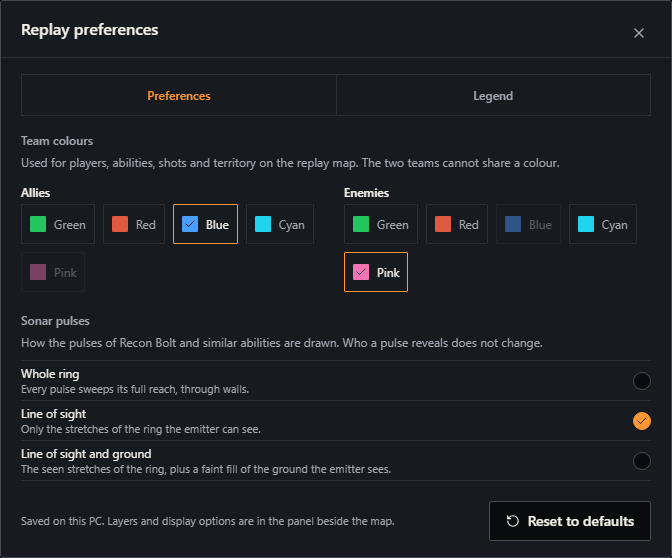
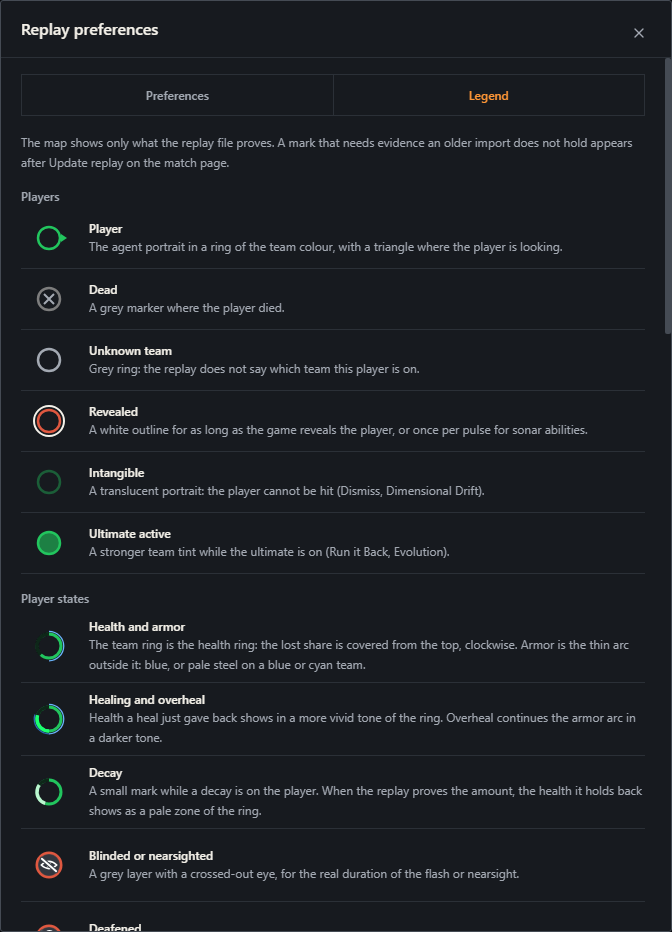
- Replay preferences and legend (fullscreen replay > the button beside Exit): choose the ally and enemy colours and how sonar pulses are drawn. The Legend tab explains every mark and player state on the map. Your choices are saved on your PC.
- Ability use per round: the round player table has a new Abilities column with the abilities each player used in that round, next to their weapons.
- Replay-powered map analysis: territory heatmaps and map control can use replay positions, which measures the time players actually held ground. Reprocess analysis shows progress, can be cancelled or retried, and states the source and coverage of the result. Results are saved for the team.
- New Discord bot for your team server (Team Settings > Integrations): connect one server with a pairing code, then ask the bot for the latest scrim results, player performance and the schedule, request a calendar image and get scrim reminders with role or player mentions. Each kind of data has its own switch and replies are private by default.
- VALORANT 13.06: the Warden is priced correctly, so buy classification no longer mislabels rounds, and it appears in rifle analysis and player weapon statistics.
- Google Calendar: connecting is more reliable, with a cancel control, clearer error messages and syncs that are followed until they finish.
- Patch notes: the profile menu has a new Patch notes entry that opens these notes in your browser.
- Fixed: starting the desktop app no longer shuts down the Sidekick collector running on the same PC.
Familiar workflows remain in place. Version 2.7.2 adds a way to watch what your numbers describe.