Tabs, a rebuilt Team Chat and VALORANT 13.08 replays
Open your pages as tabs and keep several boards side by side, chat with your team in a rebuilt Team Chat, and add VALORANT 13.08 replays again.
Version 2.8.1 lets you work in tabs: keep matches, stats, boards and your team chat open together and jump between them without reloading anything. Team Chat is rebuilt, VOD LAB stays in sync at any playback speed, and replays from VALORANT 13.08 can be added again.

Tabs
- Tabs in the title bar: open up to 12 pages and switch between them instantly. Each tab keeps its scroll position, filters and open panels. Ctrl+click or middle-click a sidebar link, a match card or a board tile to open it in a background tab.
- Shortcuts: Ctrl+T opens a tab, Ctrl+W closes it, Ctrl+Tab moves to the next one and Ctrl+1 to Ctrl+9 jump straight to a tab. Ctrl+Shift+T brings back the tab you just closed, and Alt+Left and Alt+Right go back and forward inside a tab.
- Groups when it gets busy: with more than four tabs open, tabs from the same section (Performance, Strategy, Team and so on) fold into a coloured group with one icon per tab. Hover an icon to see its name, and click the group to collapse or expand it. Every group has its own colour.
- A tab in its own window: drag a tab off the strip, or right-click it and choose Move to new window. The new window opens at the size of the one it came from.
- Several boards and documents at once (Strategy > Playbook): keep different boards open in different tabs, on another map or on the same map in another board document, and several Playbook documents next to each other. Opening a board, document or VOD review that is already open takes you to its tab.
- Your tabs come back: kogni restores your tabs when you start it again, for each team. Switching team brings back that team's tabs.
- Light in the background: tabs you are not looking at pause their videos and timers and never play sound. Replays load without freezing the window, and data a tab already loaded is shared with the others.
Team Chat
Team > Chat, on paid plans.
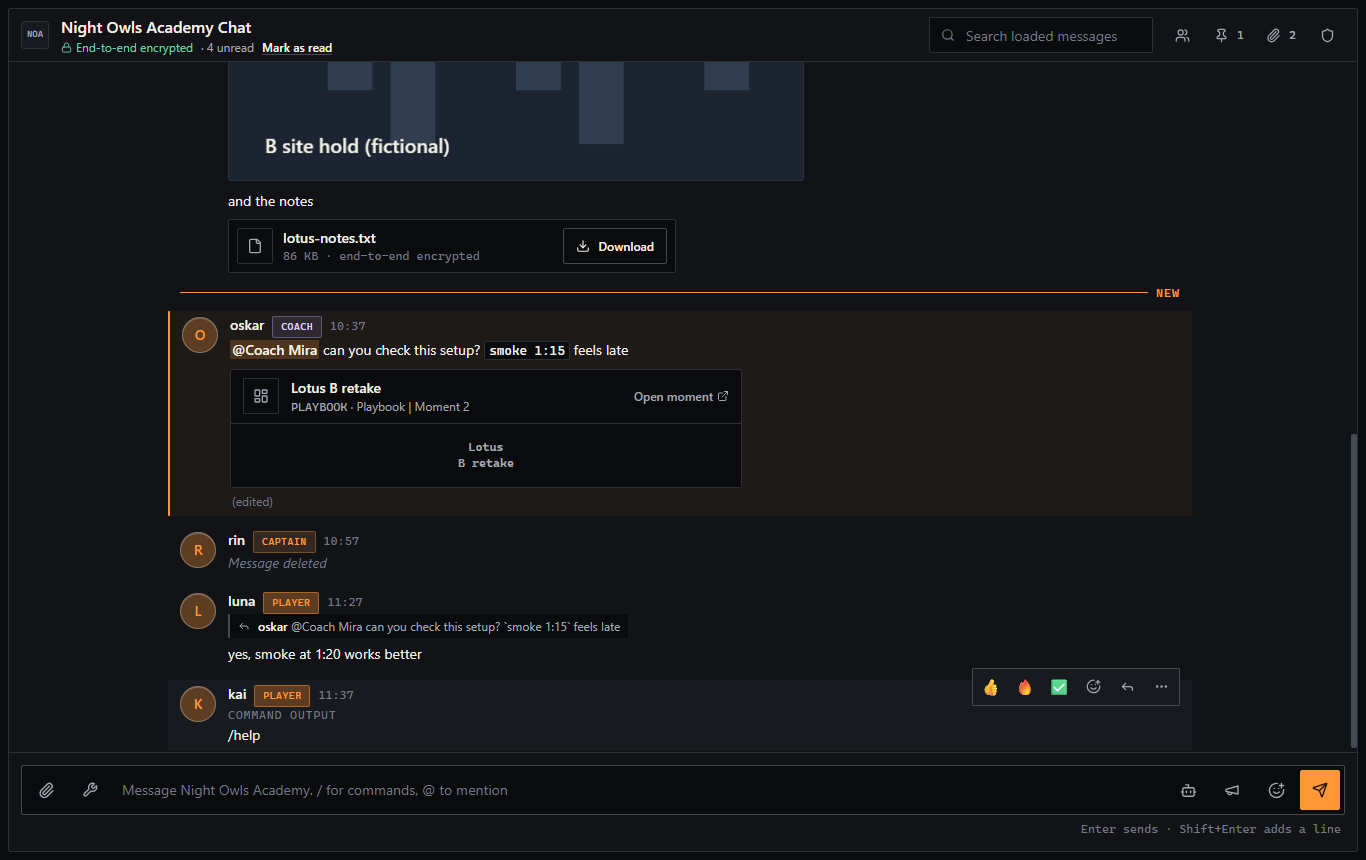
- A clearer conversation: messages are grouped by author with day separators, a New line marks where you left off, and messages that mention you stand out. Role badges, an edited marker and short placeholders for deleted messages keep the thread easy to follow.
- Message actions: hover a message for quick reactions (and see who reacted), reply, pin, copy, edit or delete. With the keyboard, the arrow keys move between messages, R replies, E edits your own message, and ArrowUp in an empty box edits your last one.
- A better composer: the box grows with your text and shows a counter near the length limit. Drag, paste or pick files and watch the upload progress. Members who can post announcements get an announcement switch.
- Find things again: Jump to latest, older messages load as you scroll, a click on a reply or a pin takes you to the original message, and search highlights its matches and can look further back.
- Members, Pinned and Files in the side panel.
- Ask kogni in the chat: type
/ask, mention@kognior use the kogni button. Answers are private to you until you share them into the chat. A notice explains that questions for the assistant leave end-to-end encryption, and there is a daily limit. - Room security for owners and managers (shield icon): see the devices that hold the room key, grant access, sign a device out and rotate the key. Choosing Full for Team Chat in a role preset no longer includes chat key management; it is now its own permission.
- Chat sync with Discord: once the team owner or primary manager turns it on (Admin > Team Settings > Kogni Discord bot > Chat sync), messages from your Discord channel appear with a Discord label and an Open in Discord button, and a notice shows that sync is on.
- Safer by default: files open and download more safely, and members who are removed from the team lose access to the chat straight away.
VOD LAB
Performance > VOD LAB > open a review.
- Playback speed is shared: followers, extra POVs and pop-out windows follow the controller's speed, so 0.5x and 2x no longer cause constant re-syncing.
- Extra POVs stay aligned: each POV corrects its own drift, and a POV that starts later than the main video waits with a countdown.
- Pop-out POV windows follow the room: a new video loads in place, a removed source closes its window, and pop-outs close with the review.
- Rounds: anchoring one round no longer hides the others, and anchoring rounds out of order no longer breaks round detection.
- Timelines: deleting a generated timeline no longer shows an error or stops other reviews' extractions, and kogni asks before deleting a marker or a timeline.
- With tabs: when the person controlling the review switches tab, only their own player pauses; the room keeps playing for everyone else.
Replays
- VALORANT 13.08 replays (Performance > Matches > open a match > Add replay): adding a replay works again for matches played on 13.08. Replays that failed after the patch can simply be added again.
KogniBOT
Admin > Team Settings > Kogni Discord bot, for team owners and managers.
- Invite KogniBOT from the panel header or as the first setup step. The new invite includes the permission chat sync needs.
- Team workspace access (Data access, on by default): lets the bot answer questions about your tasks, VOD reviews, boards, roster, announcements, goals and scouting list.
- Health warnings when the bot's channel is gone, a permission is missing, its reminder role cannot be mentioned or the bot was removed from your server.
@everyonecan no longer be picked as the reminder role.
Your matches, boards and chats stay exactly as they were. Version 2.8.1 changes how you move between them.